

If you’re an engineering executive, reporting AI productivity gains to your board while quietly worrying about what AI is costing you in production, this post is the one that matters.
Resist the temptation of reporting tokens consumed as productivity. It’s the old and naive “lines of code” metric dressed up for the AI world.
Last month we had an agent in our coding pipeline quietly introducing inefficient query patterns across our ETL processing even after all our automated tests and code reviews passed. We found the anomaly after the feature shipped, when cloud costs on our workloads started climbing. S3 objects scan volumes and Athena query costs drifted upward across our tenants. Our finops cost anomaly detection caught the problem after all dev/test cycles had passed.
Production observability helped us catch the problem. You are going to end up testing agentic workflows in production whether you intend to or not.
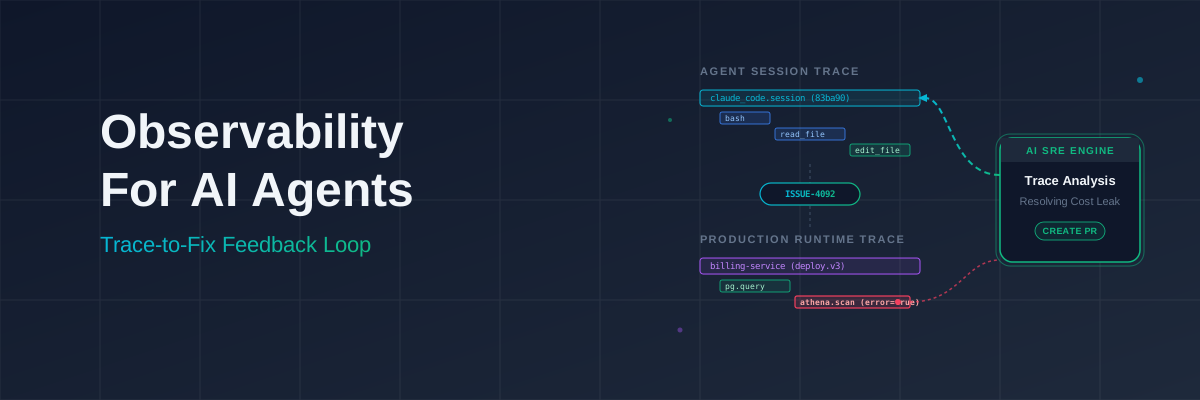
When a P1 hits, the error spans should have the commit SHA, which tells the AI SRE Agent (a concept we’ll explore shortly) which version is running and it can then correlate the changeset with the reasoning behind the change and the trace to reconstruct the failure path. This chain from build.commit_sha to work_tracker.issue_id to agent reasoning to production span is one way to manage agentic systems in production.
I’ve been experimenting with observability for agent workflows and tracking my efforts in this repo. You can drop it straight into your ~/.claude/ folder to start emitting spans to your existing OTel collector: github.com/nimeshjm/claude-otel-hooks.
Beyond debugging, tracking these decision graphs provides the exact audit trail you need. When your SOC2 auditor asks how you verify non-deterministic agent behavior in production, this trace data is the evidence you hand them.
The non-determinism problem
We now have AI Agents in our feature code and we need to address their non-deterministic nature in prod. In the old world behaviour was deterministic. The code artifact you tested in CI was basically the behaviour you deployed. For agentic workloads, the artifact you promote is just a harness around a model. The actual system behavior is code plus model weights plus prompts plus tools plus live data.
Because the same input to an LLM doesn’t produce the same output, pre-prod evals only prove the artifact passed a few samples, and even those are not guaranteed to pass in subsequent runs. If your observability was designed around known failure cases, it won’t catch this non-determinism. We have to shift from predicting bugs in pre-prod to observing the agent’s behaviour in prod. Did it use the right tools? Did it stay within its permissions? Did it burn through too many tokens?
If all you have is logs, you’re doing archaeology.
Instrumenting your Agentic Coding Tool
I use Claude Code but Codex and OpenCode have similar extensibility with OpenTelemetry.
Claude Code exposes hooks that fire at key points in the agent lifecycle, e.g.: PreToolUse, PostToolUse, Notification, Stop. You can emit OTel spans from these hooks to get a trace of what the agent actually did during a session, using the same OTel collector your production services are already sending to.
Using the claude-otel-hooks repo covers these events.
Code snippets as an example. These attributes are captured when Claude calls a tool.
# hooks/post-tool-use.py — emit a span for every tool callattrs = { "session.id": session_id, "cwd": data.get("cwd", ""), "turn.id": turn_id, "gen_ai.operation.name": "tool_call", "gen_ai.tool.name": tool_name, "gen_ai.tool.type": "extension" if is_mcp else "function", "gen_ai.tool.success": True, "tool_use_id": tool_use_id, "tool.duration_ms": (now - start_ns) // 1_000_000,}And the turn-end hook, which is where token data lives:
# hooks/stop.py — fires when the agent finishes a turnemit_span( "claude_code.turn.stop", { "session.id": session_id, "cwd": data.get("cwd", ""), "turn.id": turn_id, "gen_ai.operation.name": "chat", "gen_ai.request.model": model, "agent.stop_reason": stop_reason, "gen_ai.usage.input_tokens": input_tokens, "gen_ai.usage.output_tokens": usage.get("output_tokens", 0), "gen_ai.usage.cache_creation_tokens": usage.get("cache_creation_input_tokens", 0), "gen_ai.usage.cache_read_tokens": cache_read, "gen_ai.usage.cache_hit_ratio": cache_hit_ratio, }, start_time_ns=now, end_time_ns=now, status_ok=stop_reason not in ("error", "max_turns"), error_message=stop_reason if stop_reason in ("error", "max_turns") else "",)What you get: a trace per session showing every tool call the agent made with the timings. Hook-level instrumentation gives you traces and tool call granularity that your APM won’t reconstruct from API calls alone.
Over the past week this gave us 578 tool calls: 337 Bash, 101 Read, 67 Edit. The read-to-write ratio is healthy most of the time. Our 5.16% error rate and the claude_code.turn.stop_failure spans are what flag the sessions worth looking at.
A few things worth watching once you have this data:
High counts on specific tasks. If an agent is consistently making a lot of tool calls to complete a task that should take a couple then there is something wrong. Maybe the task is too large and it needs to scan a large part of your codebase to make progress.
Read/Write ratios. If the agent is reading far more than it’s writing that is exploration overhead which impacts your token costs.
My previous post, Agentic RAG in practice discusses some mitigation strategies.
Instrumenting your services
Enforcing instrumentation during development
While developing we ensure span attributes are consistent so our troubleshooting agent can pull and reason over them at investigation time. We have a section in CLAUDE.md that defines the pattern for observability.
## Observability- Prefer adding attributes to existing spans over creating new child spans, unless the operation is both interesting and aggregable.- Add `tenant.id` to the active span.- Add the stack trace on every error to the span and set `error=true`.
### Required attributes on every GenAI span- gen_ai.operation.name — use a predefined value: create_agent, invoke_agent, invoke_workflow, execute_tool, chat, retrieval, etc.- gen_ai.provider.name — anthropic, aws.bedrock
### Conditionally required (add when available)- gen_ai.agent.id, gen_ai.agent.name, gen_ai.agent.version- gen_ai.conversation.id — correlates all spans within a session/thread- gen_ai.request.model- error.type — when the operation fails
###Recommended (capture by default)- gen_ai.usage.input_tokens, gen_ai.usage.output_tokens- gen_ai.usage.cache_read.input_tokens, gen_ai.usage.cache_creation.input_tokensOnce it’s in CLAUDE.md, the coding agent applies this pattern consistently on every code modification.
Baseline metadata
There are a number of cross cutting attributes that we add to every span. These are set “globally” using resource attributes.
Resource attributes: set once and they are inherited by all spans.
# app.py — run once at startupimport osfrom opentelemetry import tracefrom opentelemetry.sdk.trace import TracerProviderfrom opentelemetry.sdk.resources import Resource
resource = Resource.create({ "service.name": "billing-service", "service.version": os.environ.get("BUILD_COMMIT_SHA", ""), "build.commit_sha": os.environ.get("BUILD_COMMIT_SHA", ""), "deploy.environment": os.environ.get("ENVIRONMENT", ""), "work_tracker.issue_id": os.environ.get("ISSUE_ID", ""),})
provider = TracerProvider(resource=resource)trace.set_tracer_provider(provider)Every time you emit a span, all these attributes are added. This is useful to identify failures caused by a specific version of the code.
Span attributes: specific metadata of the methods that are being executed.
tenant.id, billing.record_count and s3.bytes_scanned are specific to each invocation.
span.set_attributes({ "tenant.id": tenant_id, "billing.record_count": len(records), "s3.bytes_scanned": bytes_scanned,})build.commit_sha isn’t in this snippet, it’s on the resource attribute so we don’t need to add it individually to every span.
Connecting day 1 with day 2: agent sessions to production impact
When you have a production issue you know the build SHA1 and the issue id so you can quickly investigate if this was an issue caused in the last deployment.
The work tracker issue ID is already there
Most teams already follow a branch naming convention like feature/PROJ-1234-add-payment-flow. The issue ID is already present at PR creation and build time.
- name: Extract issue ID from branch name run: | ISSUE_ID=$(echo "${{ github.head_ref }}" | grep -oP '[A-Z]+-\d+') echo "ISSUE_ID=${ISSUE_ID}" >> $GITHUB_ENV
- name: Deploy with resource attributes run: ./deploy.sh env: BUILD_COMMIT_SHA: ${{ github.sha }} ISSUE_ID: ${{ env.ISSUE_ID }}When production behaviour changes after a deploy, you filter by the commit SHA and see every span produced by that change, whether the code was written by a human or an agent.
The agent writes back to the ticket
When the agent writes code, it should leave a record in the ticket of why it made those changes, writing back its plan.
A Stop hook fires when the agent finishes a turn. The hook receives an event dictionary containing the session ID, a summary of what the agent did, the list of files it modified, and usage metrics like tool call count and duration. You can use it to post a structured summary back to the work tracker:
Full code in stop hook.
# Post a summary comment to the Jira ticket found in the current git branch_cwd = data.get("cwd", "")ticket_id = _extract_branch_ticket(_cwd)if ticket_id: _log(f"posting jira comment to {ticket_id}") turn_data = _read_turn_data(transcript_path) plan_content = _find_recent_plan(cwd=_cwd, tool_calls=turn_data["tool_calls"]) comment = _format_jira_comment( turn_data["user_prompt"], turn_data["final_summary"], turn_data["tool_calls"], turn_data["loc_changes"], plan_content, ) _post_jira_comment(ticket_id, comment)else: _log("no jira ticket in branch, skipping comment")When a P1 hits, the error spans will have the commit SHA that can be traced back to the ticket and the agent’s reasoning. The AI SRE can correlate the reasoning behind the change, the actual changeset and the trace to reconstruct the failure path.
Agentic AI SRE trace-to-fix loop

Once you can correlate agent sessions to production behaviour, the next step is automating the investigation itself.
We pull production telemetry data nightly and run failure events through an AI model. The output is a list of issues, an investigation path and a description of the problem for an engineer to review. The creation of an incident and follow-up PR is made available to the engineer.
There are plenty of commercial and open source products that perform this loop so there’s no need to implement this from scratch unless you have specific infrastructure or telemetry requirements. An open source example that gives you a starting point is fuzzylabs/sre-agent. I have tried this in a POC to get an idea of the flow, the overall design seems a decent starting point for any customisation.
The connection of code changes with production telemetry and the reasoning of the change are all useful context for the AI SRE agent to determine the root cause and propose fixes.
Beyond debugging, this observability layer becomes your production intelligence and audit trail. When the CISO or your SOC2 auditor asks how you verify agent behavior in production, CI attestation won’t be enough.
To provide that evidence, you don’t need anything fancy: the OTel trace hierarchy is the decision tree. This trace data proving the decision making process and demonstrating how the agent stayed within its boundaries is the evidence you hand them to back your claims in SOC2 controls.
You must separate the agent’s prompts from your standard span attributes. Storing full prompt text in span attributes is an anti-pattern: attributes are indexed and may expose PII or other sensitive data in your observability backend. The OTel GenAI conventions dictate that content should be stored in span events, which can be filtered or dropped at the Collector level without touching application code.
You should strip the prompts from your observability backend entirely, storing the unredacted inputs in a write-only vault that can be opened if auditors require that level of detail. This gives you the best of both worlds. Your observability dashboard shows the metadata, timing, and decision graph, while the sensitive text inputs and thoughts are locked down in a SOC2 compliant vault accessible only during an audit.
OTel is the foundation

OpenTelemetry is the standard we’re betting on. It’s vendor neutral, CNCF graduated and well supported across every language and platform we run. However, it’s worth noting that nearly all gen_ai.* attributes carry Development stability badges. Attribute names can change without a major version bump, so anyone building on gen_ai.tool.name or gen_ai.usage.input_tokens today may need to rework their queries when the spec stabilizes.
We run two backends: Honeycomb and SigNoz. Both have a SaaS offering and SigNoz also has a self hosted version that is incredibly easy to spin up with docker compose for prototyping or in air-gapped environments. Simply configure your apps’ OTEL_EXPORTER_OTLP_ENDPOINT to point to it and traces start flowing.
The Claude Code Sessions dashboard we run has 16 panels: time-series for sessions, tool calls, token usage (input, cache, output), cache hit ratio, and model usage; tables for tool failures by gen_ai.tool.name, permission denials, tool duration, lines edited per session, stop reason distribution, subagent activity, and context compaction.
Figure 1: Our Claude Code Sessions dashboard in Honeycomb, monitoring overall session performance, token consumption, and model utilization.
The two panels I look at most are tool failures and permission denials. Last week those told me the agent was hitting a Bash permission boundary on a specific workflow, where it was trying to access data outside of the boundaries we had set. Not a desirable behaviour so we took steps to correct it.
Figure 2: Honeycomb panels isolating tool failures by name and permission denials, highlighting the exact moments an agent breaches defined boundaries.
On the Honeycomb side the Canvas investigation tool offers a really good experience. The more context we can include in our spans, the better the investigation is.
One pattern at the companies navigating this well: they treat observability as a requirement before any agentic system ships, not something they bolt on after the first incident. You can’t predict the failure modes of a non-deterministic system in advance. You can make sure you’ll be able to see what happened when it goes wrong.
What to do on your next SRE/DevOps/Platform Engineering sprint
-
Clone claude-otel-hooks and install in the machines of every person using Claude Code. Configure it to point to your OTel collector, to Honeycomb, to SigNoz Cloud or deploy your own. The SigNoz docker-compose setup is a proof of concept for local evaluation. For production use, harden the deployment or use SigNoz Cloud or Honeycomb instead.
-
Import the Claude Code Sessions dashboard JSON from the hooks repo. Sixteen panels ready on first session.
-
Add three resource attributes to every service:
build.commit_sha,deploy.environment,work_tracker.issue_id. -
Add the observability block to CLAUDE.md of your code repos.
The cost spike took a week to surface because we didn’t have SLOs or alerting on athena.query_cost or s3.bytes_scanned as span attributes at the time. Every incident that improves the instrumentation makes the next incident faster to find. That’s compound engineering, you invest in instrumentation once and it pays you back repeatedly on following investigations.