
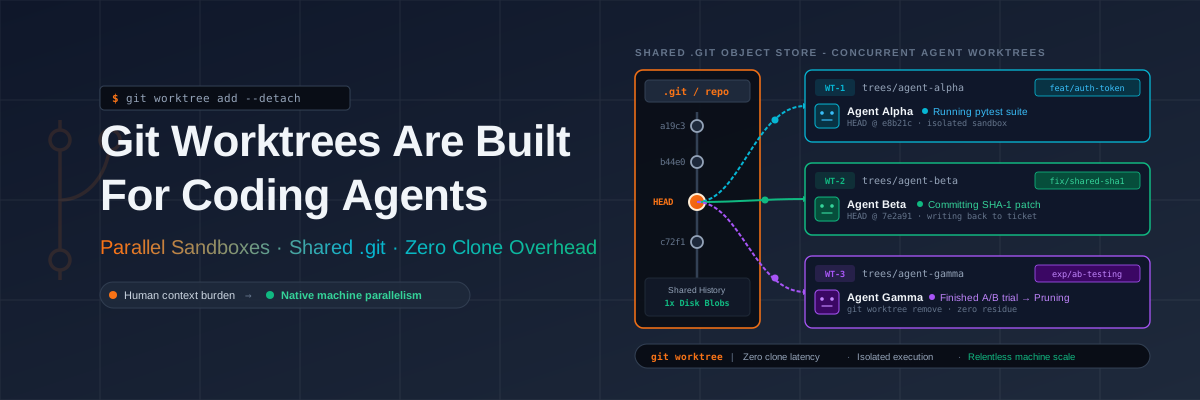

Sometimes there are features that have existed for a long time but were seldom used. I had never heard or used git worktrees until recently while experimenting with parallelizing work across AI agents.
What are git worktrees?
Git introduced the worktree command in Git 2.5 (July 2015). The motivation was switching between branches instead of committing or stashing. Worktrees were implemented to create additional working directories that share the same underlying repository, so you can have main checked out in one directory and feature/login in another, simultaneously.
A git worktree is a linked working directory backed by the same .git repository as your main checkout. Instead of cloning a repository a second time you ask git to create a new working tree that shares the same history and objects.
That shared history can be problematic if the agents don’t know about it. I was running two worktrees and agent A picked a SHA1 that had been committed by agent B in a different branch. By capturing the reasoning and actions in each turn I was able to find out how it happened. A unit test setup was copying the entire repo and performing git reset commands with SHA1 hashes. As these tests were running simultaneously in different worktrees the SHA1s were getting mixed up. Now why would the tests want to copy the entire repo? These are the things you only find out in retrospect if you don’t inspect all PRs that get merged.
What git worktrees give agents
Git’s worktree mechanism lets a process maintain multiple views of the same repository, each with its own HEAD and working directory. Coding agents can spin up a new worktree for A/B testing and destroy it without disturbing the main checkout.
An agent can git worktree add a throwaway branch, make some changes, run the test suite and git worktree remove it. If the experimentation fails nothing is left behind but if it passes the branch is ready to merge.
Why not just clone?
My default approach was to do a git clone for each agent. That provides full isolation but it adds disk usage and latency, which at scale with multiple agents starts to slow things down.
Figure 1: Full clones duplicate the entire .git object database every agent causing high disk usage and setup latency. Git worktrees share one common .git repository provisioning isolated workspaces.
People vs machines
The cognitive load for people
For a human, creating, switching and cleaning up worktrees is a lot of context switching.
Worktrees require you to juggle multiple terminal sessions and switch contexts frequently. This is a lot for a single person to manage.
Why agents don’t feel the friction
AI coding agents can spin up new worktrees for A/B testing and destroy them without disturbing the main checkout. AI agents being relentless machines that can create and experiment in multiple branches at the same time, git worktrees fit the use case nicely.
Worktrees weren’t new, the novelty is that AI agents can make use of it at scale.